
Calculate and Aggregate Queries
This section covers the following topics:
- Calculated queries
- Aggregate queries
Overview
Calculated queries
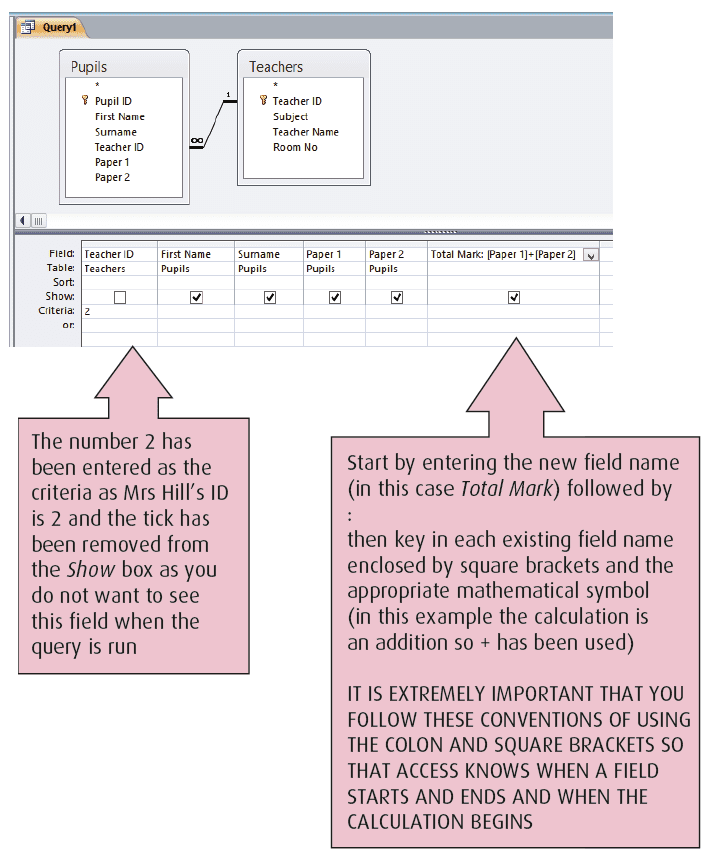
Create a new field to perform a calculation using numerical values from existing fields by setting up a query which includes the calculation. This ensures that any changes made to information in the table are used when the query is run.
For example, pupils’ marks for their Administration exam (two papers) have been added to the database. To find the total mark achieved by pupils taught by Mrs Hill (Teacher ID 2) without seeing this field, run a query as shown in Design View.
For more on this topic, have a look at our Higher Administration and IT Study Guide, pp. 26–27.
Related Videos
Watch this video to learn more.
Quizzes
Click a link below to take a topic quiz:
Thoughts
Find the Calculations in Queries and Aggregate Queries folders for a number of exercises where you can practise setting up these types of queries.